Blog
Blog
Every time you open a website, stream a video, read a blog, or shop online, you are interacting with web hosting in some form. While most people focus on website design, content, or apps, hosting works silently in the background, keeping everything available and functional. Without web hosting, the internet as we know it would not exist.
In 2026, web hosting has evolved far beyond basic file storage. It now plays a central role in website speed, security, scalability, user experience, and search engine performance. Modern websites handle high traffic, support real-time interactions, display multimedia content, and securely manage sensitive user data. All of this depends on a strong hosting foundation.
This article provides a comprehensive and practical explanation of web hosting. Whether you are a beginner, a tech enthusiast, or someone planning to build a website, this guide will help you understand the backbone of the internet.
What Is Web Hosting
Web hosting is a service that stores website files and delivers them to users through the internet. A website includes multiple elements, including text, images, videos, code files, databases, and scripts that work together to deliver a complete online experience.These components must be stored on a powerful computer that stays connected to the internet at all times. This computer is called a server.
A hosting provider owns and manages servers in secure data centers. These data centers are equipped with high-speed internet connections, backup power, cooling systems, and security infrastructure. When a user types a website address into a browser, the browser sends a request to the hosting server. The server processes the request and sends the required files back to the user’s device.
In simple terms, web hosting is what allows your website to be visible and accessible on the internet, twenty-four hours a day.
How Web Hosting Works Step by Step
First, a website owner selects a hosting provider and buys a hosting plan. The plan defines storage capacity, bandwidth, memory, and processing power that the website can use.
Next, the website files are uploaded to the hosting server. This can be done using a control panel, file manager, FTP software, or automated installation tools. Many hosting providers offer one-click installation for popular platforms such as WordPress, Joomla, and Drupal.
After that, a domain name is connected to the hosting server through DNS settings. The domain acts as the website’s address, while the hosting server stores the content.
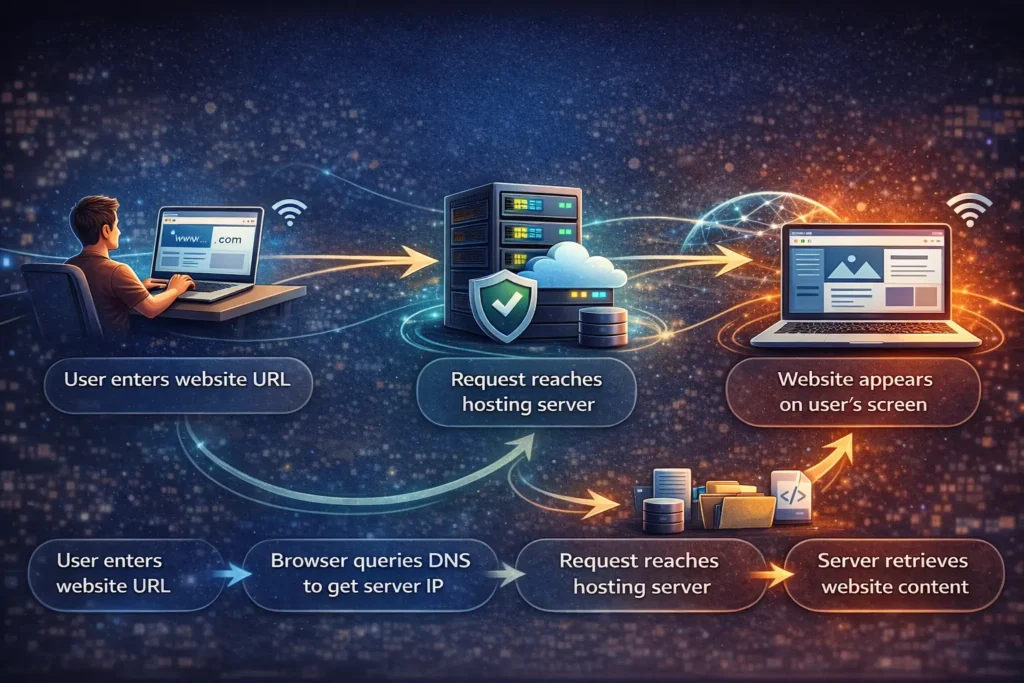
When a visitor enters the domain name into a browser, the browser checks DNS records to locate the correct server. The server then sends the website data back to the browser, allowing the page to load. This entire process usually happens in a fraction of a second.
Why Web Hosting Matters
Web hosting has become a critical factor in website success. Users expect websites to load instantly, remain available at all times, and protect their data. Even small delays can cause visitors to leave.
Search engines also consider hosting-related factors such as page speed, uptime, and HTTPS security when ranking websites. Poor hosting can negatively impact search visibility, regardless of content quality.
In addition, modern websites rely on integrations, APIs, analytics tools, payment gateways, and cloud services. Hosting must support these technologies smoothly. As the internet continues to grow, the quality of hosting can directly influence user trust, website performance, and long-term growth.
Main Types of Web Hosting Explained
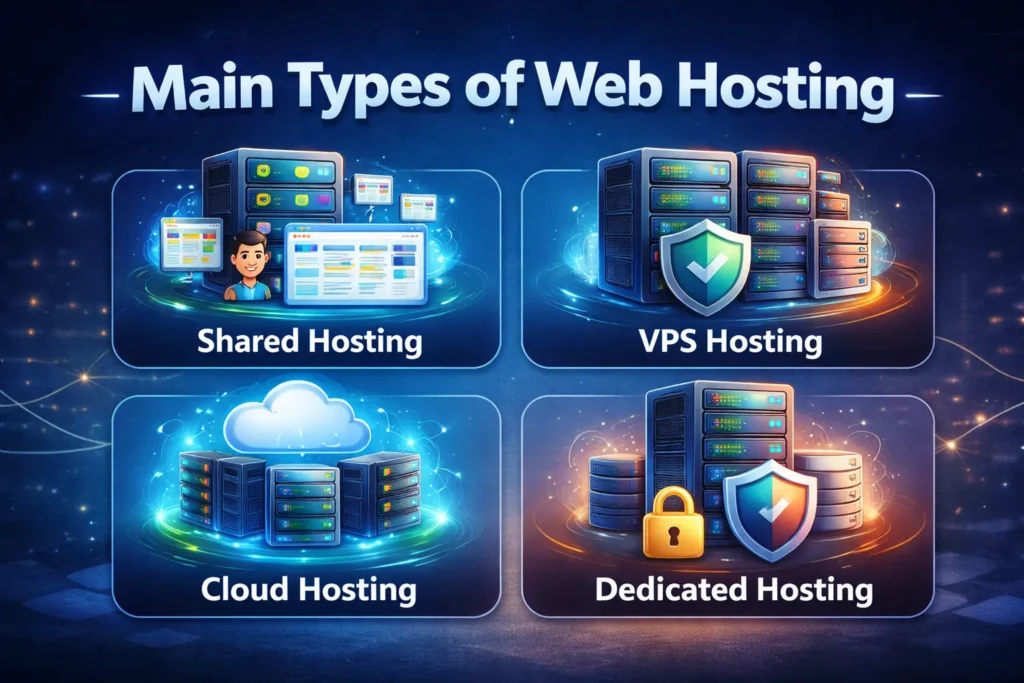
Different websites have different requirements. That is why hosting comes in multiple types.
Shared Hosting
Shared hosting is the most basic and affordable hosting option. Multiple websites share the same server and its resources, including storage, memory, and CPU power.
This type is ideal for beginners, personal blogs, hobby websites, and small projects with low traffic. Shared hosting is easy to manage and usually includes a simple control panel.
However, performance can be inconsistent. If one website on the server uses too many resources, other sites may slow down. Custom server configurations are limited.
VPS Hosting
VPS stands for Virtual Private Server. In VPS hosting, one physical server is divided into multiple virtual servers using virtualization technology. Each website receives dedicated resources.
VPS hosting provides better performance, stability, and control compared to shared hosting. It is suitable for growing websites, medium-traffic blogs, and small to medium businesses.
Users can install custom software and configure server settings. Some technical knowledge is required, especially for unmanaged VPS plans.
Dedicated Hosting
Dedicated hosting provides an entire physical server for a single website or application. All server resources are exclusive to one user.
This hosting option delivers top-level performance, strong security, and full control over server settings. Large enterprises, high-traffic websites, and complex applications rely on it for stable and scalable performance
Dedicated hosting is expensive and usually requires experienced system administrators or managed services.
Cloud Hosting
Cloud hosting uses a network of interconnected servers instead of a single physical machine. Website data is distributed across multiple servers.
If one server fails, another server automatically takes over. This makes cloud hosting highly reliable and scalable.
Cloud hosting is ideal for e-commerce stores, SaaS platforms, and websites with fluctuating traffic. Resources can be scaled up or down based on demand.
Managed Hosting
Managed hosting means the hosting provider handles technical responsibilities such as server maintenance, updates, security patches, backups, and performance optimization.
This type is available for VPS, cloud, and WordPress hosting. It is suitable for users who want strong performance without managing server operations themselves.
Managed hosting costs more but saves time and reduces technical risk.
WordPress Hosting
WordPress hosting is specifically optimized for WordPress websites. It includes features such as automatic updates, caching, enhanced security, and WordPress-specific support.
This hosting type is ideal for bloggers, content creators, and businesses that rely on WordPress for content management.
Reseller Hosting
Reseller hosting allows individuals or businesses to sell hosting services to others. The reseller purchases server resources in bulk and distributes them among clients. This option is popular among web developers, freelancers, and agencies offering website services.
Web Hosting Comparison Tables
Comparison tables help readers quickly understand differences between hosting types and choose the right option based on real needs. These tables are useful for beginners and decision-makers who want to build a modern website in 2026.
Web Hosting Types Comparison
| Hosting Type | Best For | Performance |
|---|---|---|
| Shared Hosting | Beginners, small blogs | Low to medium |
| VPS Hosting | Growing sites, small businesses | Medium to high |
| Dedicated Hosting | High-traffic sites, enterprises | Very high |
| Cloud Hosting | Ecommerce, SaaS, scalable apps | High and stable |
| Managed Hosting | Non-technical users | High |
| WordPress Hosting | Content-driven sites | Optimized for WP |
Key Features of Web Hosting in Detail
Hosting features define the real value of a hosting service.
Storage Technology
Storage determines how much data a website can store. This includes website files, images, videos, databases, and emails.
Modern hosting providers use SSD and NVMe storage. These technologies are significantly faster than traditional hard drives. Faster storage improves page load times and server response. Media-heavy websites and e-commerce platforms benefit greatly from modern storage solutions.
Bandwidth and Data Transfer
Bandwidth controls how much data can be transferred between the server and visitors. High-traffic websites require higher bandwidth to maintain smooth performance.
Many hosts advertise unlimited bandwidth, but fair usage policies still apply. Understanding actual limits is important for traffic-heavy websites.
Uptime and Reliability
Uptime measures how often a website remains accessible. A 99.9 percent uptime guarantee means minimal downtime per year.
Reliable hosts use backup servers, monitoring systems, and redundant infrastructure to maintain availability. Downtime affects both user trust and search engine rankings.
Speed and Performance Optimization
Speed is a critical ranking and usability factor. Hosting providers use caching, optimized server software, HTTP/3 support, and CDN integration to improve performance. Faster websites reduce bounce rates and improve engagement.
Security Features
Security protects websites from malware, hacking attempts, and data breaches. Essential features include SSL certificates, firewalls, malware scanning, and DDoS protection. In 2026, AI-driven security systems are increasingly used to detect and respond to threats in real time.
Control Panel and Management Tools
A control panel allows users to manage domains, files, databases, emails, and settings. A user-friendly interface simplifies website management. Popular options include cPanel and custom dashboards provided by hosting companies.
Backup and Restore Options
Backups are essential for data protection. Automatic backups allow websites to recover quickly after errors, hacks, or accidental deletions. Daily backups are especially important for business and e-commerce websites.
Website Transfer and Migration
Website transfer, also called website migration, is the process of moving a website from one hosting provider or server to another. This can involve transferring files, databases, emails, DNS settings, and applications. Migration is a critical feature for anyone who wants to upgrade hosting, improve performance, or take advantage of advanced features offered by a new provider.
Most modern hosting providers include free or assisted migration services. Shared, VPS, cloud, and WordPress hosting plans often come with tools or experts that handle the migration process. These services ensure that websites experience minimal downtime and that all content, settings, and functionality remain intact.
Key benefits of hosting that offers migration support include:
- Seamless transition: Your website remains online with little to no disruption during the move.
- Data integrity: All files, databases, and configurations are safely transferred.
- Time and effort saving: Migration tools or expert assistance reduce manual work and errors.
- Scalability and upgrades: Moving to a higher-performing hosting plan becomes easier as your website grows.
For beginners, migration support provides peace of mind when upgrading hosting in the future. Intermediate and advanced users benefit from migration tools that minimize downtime and ensure complex setups, such as e-commerce stores or SaaS platforms, continue to function smoothly.
Customer Support
Good customer support reduces downtime and frustration. Reliable hosting providers offer 24/7 support through chat, tickets, or phone. Fast response time and knowledgeable staff make a significant difference.
Feature Comparison Across Hosting Types
| Feature | Shared | VPS | Dedicated | Cloud |
|---|---|---|---|---|
| Dedicated Resources | No | Yes | Yes | Yes |
| High Traffic Handling | Poor | Good | Excellent | Excellent |
| Custom Software Install | No | Yes | Yes | Yes |
| Built-in Scalability | No | Limited | No | Yes |
| Cost Efficiency | Very high | Moderate | Low | Flexible |
Performance and Reliability Comparison
| Factor | Shared | VPS | Dedicated | Cloud |
|---|---|---|---|---|
| Average Load Speed | Slow | Faster | Very fast | Very fast |
| Downtime Risk | Higher | Low | Very low | Very low |
| Traffic Spike Handling | Poor | Moderate | Good | Excellent |
| Server Redundancy | No | No | No | Yes |
Uses of Web Hosting in the Real World
Web hosting provides the essential infrastructure required to deploy, maintain, and expand functional websites for a global audience. From personal blogs and business sites to online stores, portfolios, and web apps, hosting provides the space, speed, and reliability needed to keep everything running smoothly on the internet.
Personal Websites and Blogs
Individuals use hosting to share ideas, knowledge, or experiences. Shared hosting or WordPress hosting is usually sufficient. Ease of use and affordability are key priorities.
Business Websites
Businesses rely on hosting to present their brand, services, and contact information. Performance, security, and uptime are essential. VPS or managed hosting is commonly used.

E-commerce Stores
Online stores handle payments, customer data, and inventory. Hosting must support encryption, fast loading, and scalability. Cloud hosting and managed e-commerce hosting are popular choices.
Portfolio and Freelance Websites
Designers, photographers, and freelancers use hosting to showcase their work. Visual performance and reliability matter most.
Educational Platforms and Online Courses
Learning platforms host videos, quizzes, and user accounts. Hosting must handle high bandwidth usage and stable performance.
SaaS Platforms and Web Applications
Software services depend heavily on hosting infrastructure. Cloud and dedicated hosting provide flexibility and control.
Community Forums and Membership Sites
Forums and membership platforms require reliable databases and smooth user management. Hosting must scale as user numbers grow.
How to Choose the Right Web Hosting
Choosing a hosting starts with understanding a website’s goals. Consider the type of website, expected traffic, and future growth. Beginners should prioritize ease of use. Growing projects should focus on scalability.
Check performance features, security standards, backup policies, and support quality. Avoid choosing solely based on price. Good hosting supports growth without frequent migrations.
Quick Decision Matrix
| Your Situation | Best Hosting Choice |
|---|---|
| First website, low traffic | Shared Hosting |
| Blog growing steadily | VPS or WordPress Hosting |
| Business website | Managed VPS or Cloud |
| Ecommerce store | Cloud Hosting |
| SaaS or app platform | Cloud or Dedicated |
| Agency managing clients | E-commerce store |
Hosting Guide for Beginners
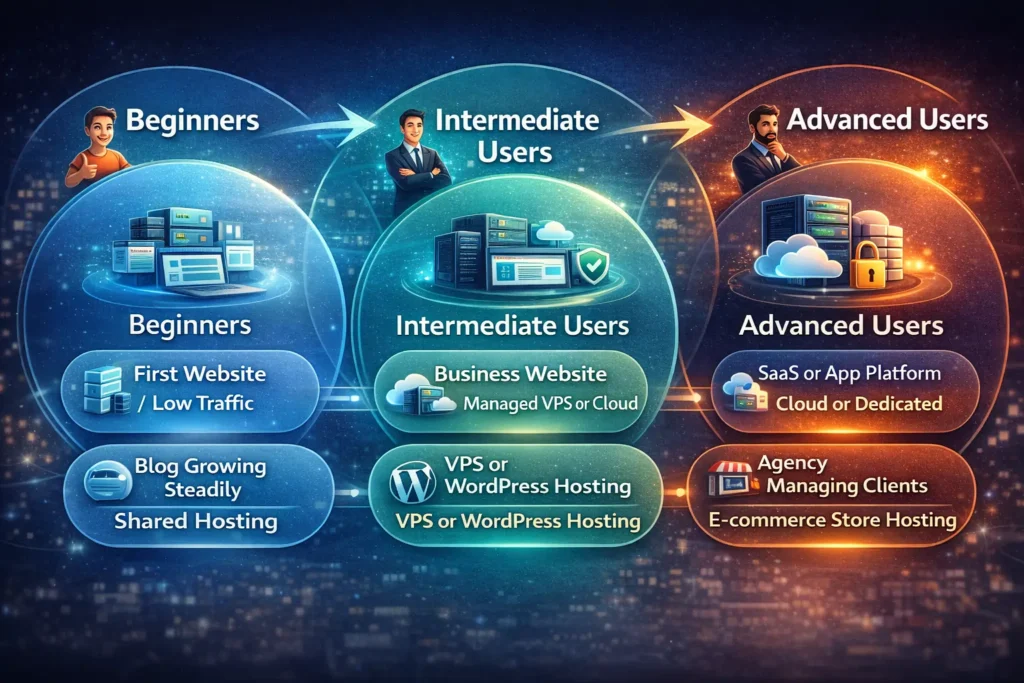
Beginners should choose hosting that is simple, affordable, and easy to manage. If you are launching your first website, personal blog, or small project, shared hosting or basic WordPress hosting is usually enough. These options handle most technical tasks for you, including setup, security, and updates. The focus at this stage should be on learning and creating content, not managing servers.
Hosting Guide for Intermediate Users
Intermediate users need hosting that balances control and convenience. As traffic grows or monetization begins, VPS or managed cloud hosting offers better speed, stability, and scalability. These options allow more customization without requiring deep server knowledge. Hosting at this level should support growth and improved performance without adding unnecessary complexity.
Hosting Guide for Advanced Users
Advanced users require powerful hosting with full control and flexibility. Dedicated servers and cloud infrastructure are ideal for high-traffic websites, e-commerce platforms, and custom applications. These environments support advanced configurations, security controls, and performance optimization. At this stage, hosting is a critical part of system architecture, not just a place to store a website.
Common Web Hosting Mistakes
Many beginners choose the cheapest hosting option without considering performance. This often leads to slow loading and poor user experience.
Another mistake is ignoring backups and security features. Some website owners also underestimate future traffic, making upgrades difficult later. Planning helps avoid these issues.
When Should You Upgrade Your Hosting
Many website owners wait too long before upgrading their hosting. Clear signs that it is time to upgrade include:
- Pages load slowly, even after proper optimization
- Frequent downtime or unexpected errors
- Website crashes during traffic spikes
- Limited customization and scalability options
- Growing security risks and vulnerabilities
Upgrading your hosting early is often more cost-effective than fixing serious performance or security issues later.
Web Hosting Trends in 2026
Hosting continues to evolve rapidly. AI-driven optimization improves performance automatically. Edge computing reduces latency by serving content closer to users.
Green hosting focuses on sustainability and uses renewable energy. Security systems are becoming smarter and more proactive.
Conclusion
Web hosting is the foundation of the internet. It influences speed, security, scalability, and user trust. Understanding web hosting types, features, and real-world uses helps anyone to make informed decisions.
Whether you are exploring technology, building a website, or simply curious about how the web works, web hosting remains one of the most important building blocks of the digital world.